Sambar: A Bold Display Font for Modern Web Design and Digital Branding
Understanding Sambar’s Visual Personality and Digital Appeal
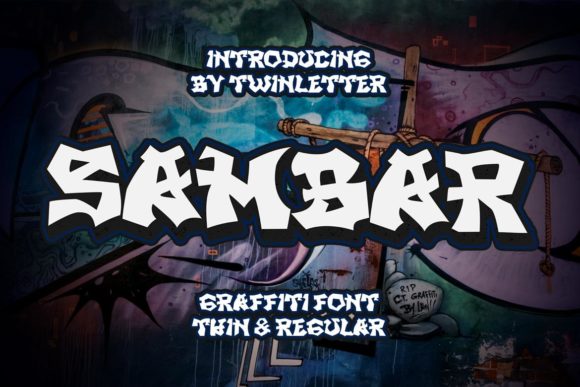
Sambar is a high-energy display font with graffiti-inspired strokes and a futuristic street art aesthetic. Its sharp edges, dynamic contours, and expressive letterforms make it a standout choice for web designers and digital creators looking to inject personality into their layouts. Unlike minimalist or neutral fonts, Sambar commands attention without sacrificing legibility, making it ideal for headers, banners, and brand-focused web elements.
As a web designer, I’ve found that Sambar works especially well in digital environments where visual impact and brand tone are crucial. Its bold presence can define the character of a website, landing page, or online store without overwhelming the user experience. When used strategically, Sambar becomes more than just a font—it becomes part of the design language.
How Sambar Enhances Web Design and User Engagement
In digital design, typography plays a critical role in guiding user attention and reinforcing brand messaging. Sambar’s graffiti style brings a sense of urban energy and creativity, which makes it perfect for modern brands that want to appear bold, youthful, and innovative.
- Hero sections benefit from Sambar’s strong visual presence, helping to anchor the page and set the tone.
- Call-to-action buttons gain more visual weight when using Sambar in short phrases or icons, increasing click-through rates.
- Logo treatments can incorporate Sambar for a stylized brand mark that stands out in both web and print formats.
Because of its decorative nature, Sambar is best used for short bursts of text rather than long paragraphs. This makes it ideal for section headers, banners, and promotional graphics where visual hierarchy and readability are key.
Using Sambar in Real-World Web and Digital Projects
Let’s look at a few practical applications where Sambar shines in digital design:
- Creative portfolios: Use Sambar in the hero section or project titles to highlight artistic flair and originality.
- Boutique online stores: Apply it to product banners or limited-time offers to create urgency and visual interest.
- Coaching or personal brand websites: Integrate Sambar into taglines or service headers to convey confidence and modernity.
- Course sales pages: Make headlines pop with Sambar while keeping body text in a clean sans serif for contrast and readability.
For example, a landing page promoting a design bootcamp could use Sambar for the main headline, paired with a neutral, readable font like Montserrat or Inter for body copy. This creates a strong visual hierarchy while ensuring users can scan and absorb content efficiently.
Readability and Responsive Design Considerations
When using Sambar on the web, it's important to consider how it performs across screen sizes and color schemes. On mobile devices, avoid using Sambar at very small sizes—stick to headers or accent text to maintain clarity. For dark backgrounds, ensure there's enough contrast by using white or neon-style outlines. On light backgrounds, a subtle drop shadow or stroke can help the font stand out.
When overlaying Sambar on images or gradients, test readability in different lighting conditions and browser zoom levels. It’s also a good idea to provide fallback font styles or alternate color treatments for accessibility compliance.
Font Pairing Strategies with Sambar
Sambar’s expressive style works best when balanced with simpler typefaces. Here are some effective font pairing combinations:
- Sans serif body fonts like Open Sans or Lato keep the design modern and readable when paired with Sambar headlines.
- Serif fonts such as Playfair Display add contrast and sophistication, ideal for editorial or luxury branding sites.
- Monospaced fonts like Fira Code create a tech-forward pairing, useful for developer tools or coding-related landing pages.
These combinations help maintain a strong visual rhythm while ensuring content remains scannable and user-friendly. Always test font pairings across devices and browsers to ensure consistent rendering and performance.
What to Check Before Using Sambar in Web Projects
Before integrating Sambar into a live website or client project, verify the following:
- Webfont availability: Ensure the font includes WOFF and WOFF2 formats for optimal browser support.
- Alternate glyphs and ligatures: Some display fonts offer stylistic alternates that can enhance visual appeal in headlines.
- Weight variations: If the font includes bold, light, or outline versions, use them to create depth and contrast in design layouts.
- Multilingual support: Check if the font covers Latin Extended characters, especially for international websites.
These details ensure that Sambar functions smoothly in live web environments and supports a wide range of content and design use cases.
Commercial Licensing and Usage Rights
One of the most important considerations when using premium fonts like Sambar is licensing. Always confirm that the font is cleared for commercial web use, especially when deploying it on client sites, online stores, or SaaS product interfaces.
Some font licenses restrict use in digital templates or web applications, so it's essential to review the terms before embedding Sambar in a project that will be distributed or resold. Many premium font marketplaces offer webfont licenses that include usage across multiple domains and projects, which is ideal for freelancers and agencies.
Final Notes on Integrating Sambar Into Your Design Workflow
Sambar is more than just a decorative typeface—it's a design asset that can elevate your web projects when used with intention. Whether you're designing a landing page, rebranding a digital product, or creating a portfolio site, Sambar brings a distinctive voice to your typography.
By understanding its strengths and limitations, you can apply Sambar effectively to headers, banners, and brand elements while maintaining readability and visual harmony. When paired with clean, functional fonts and tested for performance, Sambar becomes a powerful tool in your digital design toolkit.